Gastya: A Handwritten Font for Creative Web Design
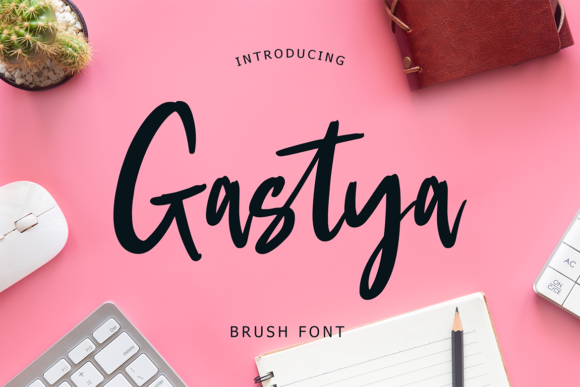
As a web designer, I'm always on the lookout for typefaces that can add a unique touch to my projects. Gastya, a brush-style handwritten font, is one such gem. Its fluid, dynamic strokes and casual elegance make it an excellent choice for bringing a personal, creative flair to any digital experience.
The Visual Charm of Gastya
Gastya's brush-like texture and flowing lines give it a natural, handcrafted feel. This makes it perfect for projects that need a human touch, whether it's a creative portfolio, a boutique online store, or a coaching website. The font's personality is both inviting and energetic, making it a standout choice for headers, hero sections, and call-to-action areas.
Enhancing Readability and Visual Hierarchy
While Gastya is visually appealing, it's important to use it judiciously to maintain readability. For instance, it works well in large sizes for headlines and titles, where its distinctive style can be fully appreciated without overwhelming the reader. For body text and longer paragraphs, consider pairing Gastya with a clean, simple sans serif font to ensure clarity and legibility.
- Headlines and Titles: Use Gastya for main headings and section titles to draw attention and set a creative tone.
- Call-to-Action Areas: Apply Gastya to short, impactful phrases in buttons and CTA sections to encourage engagement.
- Logo Text and Decorative Accents: Incorporate Gastya for logo design and decorative elements to add a unique, artistic touch.
Creating a Consistent Online Identity
A consistent brand identity is crucial for building trust and recognition. Gastya can play a significant role in establishing this consistency. By using it across different elements like banners, blog graphics, and social media posts, you can create a cohesive look that resonates with your audience. Just be mindful of overuse; too much of a good thing can dilute its impact.
Practical Tips for Using Gastya
Here are some practical tips to get the most out of Gastya in your web designs:
- Responsive Design: Test Gastya on various screen sizes to ensure it remains legible and visually appealing. Adjust line heights and letter spacing as needed.
- Backgrounds and Overlays: Use Gastya on both light and dark backgrounds, but be cautious with image overlays. Ensure there's enough contrast to keep the text readable.
- Font Pairing: Pair Gastya with a complementary sans serif or serif font for a balanced, professional look. Popular choices include Roboto, Lato, and Merriweather.
Commercial Licensing and Usage
When using Gastya in commercial projects, such as client websites, online stores, or digital templates, it's essential to check the licensing terms. Most premium fonts, including Gastya, come with specific usage rights, so make sure you have the appropriate license for your intended application. This ensures you're not inadvertently violating any copyright laws and helps support the creators who made this beautiful font possible.
Conclusion
Gastya is a versatile and visually striking handwritten font that can elevate your web design projects. Whether you're working on a creative portfolio, a product landing page, or a branded content site, Gastya can help you achieve a unique, engaging, and memorable online presence. Just remember to balance its use with more traditional fonts to maintain readability and a professional appearance. Happy designing!