Enhance Your Web Design with Rosellar Font
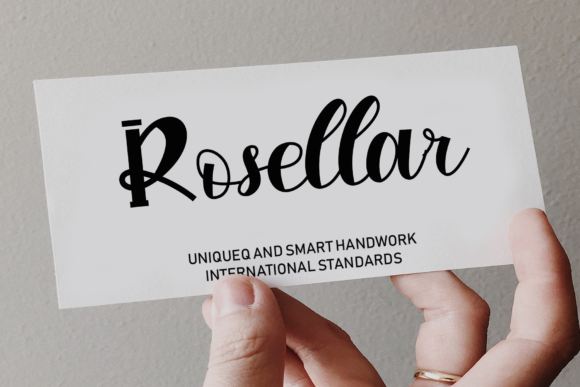
As a web designer, choosing the right typeface can make or break your digital projects. Rosellar is a unique and attractive manual script font that brings a playful yet sophisticated touch to any design. Its elegant, flowing lines and distinctive character make it an excellent choice for adding a creative flair to your work.
Visual Characteristics and Personality of Rosellar
Rosellar's handwritten style is both charming and versatile. The font features smooth, connected strokes that give it a natural, organic feel. This makes it perfect for designs that need a personal, human touch. Whether you're working on a creative portfolio, a boutique online store, or a coaching website, Rosellar can help set the right tone and capture the attention of your audience.
Using Rosellar in Web Design
Rosellar is particularly effective in areas where you want to make a strong visual impact. Here are some practical applications:
- Website Headers and Hero Sections: Use Rosellar for the main title or tagline to create an immediate, engaging impression. Its decorative nature makes it ideal for drawing the eye and setting the mood.
- Landing Pages and Call-to-Action Areas: Incorporate Rosellar for short, impactful phrases or buttons. It adds a touch of elegance and can help guide users towards desired actions.
- Online Shop Banners and Product Descriptions: Enhance the visual appeal of your product listings with Rosellar. It can be used for category titles, special offers, or featured products to create a premium and inviting look.
- Blog Graphics and Digital Ads: Use Rosellar for blog post titles, social media graphics, and digital ads. Its unique style can help your content stand out and attract more clicks and shares.
Readability and Visual Hierarchy
While Rosellar is visually striking, it's important to consider its readability, especially on smaller screens. For optimal legibility, use Rosellar primarily for larger text elements like headers and titles. Pair it with a clean, simple sans serif font for body copy to ensure that the overall layout remains readable and user-friendly.
Font Pairing and Design Consistency
To maintain a balanced and professional look, pair Rosellar with complementary fonts. A good combination could be using Rosellar for headings and a sans serif font like Arial or Helvetica for the body text. This pairing ensures that the design is both visually appealing and easy to read.
For a more editorial and refined look, consider pairing Rosellar with a serif font. This can add a touch of sophistication and make your design feel more polished and upscale.
Practical Considerations for Using Rosellar
When incorporating Rosellar into your projects, keep the following in mind:
- File Formats and Webfont Availability: Check if Rosellar comes in various file formats (e.g., TTF, OTF) and if a webfont version is available. This will ensure compatibility across different platforms and devices.
- Alternates, Weights, and Multilingual Support: Explore the included styles and alternates to add variety and personality to your designs. Also, verify if the font supports multiple languages, which is crucial for global audiences.
- Commercial Licensing: Ensure that you have the appropriate commercial license for using Rosellar in client projects, online stores, landing pages, and other digital assets. This is essential for maintaining legal compliance and professionalism.
In conclusion, Rosellar is a powerful tool for enhancing the visual appeal and brand identity of your digital projects. By thoughtfully integrating it into your designs, you can create a memorable and engaging experience for your audience. Whether you're designing a creative portfolio, a boutique online store, or a product landing page, Rosellar can help you achieve a unique and professional look that stands out in the digital landscape.